Consolidated Case Model for Payment Instructions: Streamlining Wealth Assist
Background & Project Initiation
At our financial services firm, Wealth Assist consultants and bankers faced significant inefficiencies while managing client payment instructions. Each instruction required creating a separate Salesforce case, which led to duplicated effort, fragmented quality assurance, and increased turnaround times. This manual fragmentation degraded client experience and elevated cognitive load for users.
As the Senior User Experience Designer, I collaborated with cross-functional teams to initiate a feature focused on consolidating multiple payment instructions into a single parent case with related transactions. Our goal was to simplify workflows, reduce redundant case creation, and improve audit traceability.
This inefficiency caused:
Identified duplication as a root cause of inefficiency and errors.
Engaged stakeholders early to align on compliance and operational requirements.
Prioritized a user-centric design to align role-specific views with user
responsibilities.
A typical high-net-worth client summed it up:
“I wasn’t in crisis, but it always felt like I was one more form away from frustration.”
Multiple cases per client: up to 5/day |
|---|
Initial workflow infographic showing fragmented case creation

Problem Statement & Success Criteria
The core problem was the need to create separate Salesforce cases for each payment instruction, leading to duplicated work, delayed turnaround, and inconsistent quality. This resulted in a high consultant workload and reduced client satisfaction.
We defined clear success criteria:
Enable multiple payment instructions under a single consolidated case.
Reduce duplicate case creation by at least 50%.
Achieve a first-time-right capture rate of 95%.
Cut turnaround time for multiple instructions by 30%.5. Improve QA efficiency and reduce rework by 25%
Focused criteria balanced operational efficiency with user experience.
Ensured measurable KPIs aligned with business goals..
Target 95% first-time-right capture |
|---|
Success metrics dashboard mockup
Senior Wealth Assist consultant captured this sentiment:
“We weren’t in a crisis, but every extra case made me feel like banking was harder than it needed to be.”
Research Methodology & User Interviews
To deeply understand pain points, I led a mixed-methods research approach combining contextual inquiries, stakeholder workshops, and in-depth user interviews with 8 Wealth Assist consultants and bankers. We employed task analysis and shadowing to capture real-world workflows.
Key research tools included:
Journey mapping to identify friction points
Usability testing of existing case management
Root cause analysis of duplicate case creation
Users expressed frustration over repetitive data entry and lost visibility of consolidated payments.
QA teams highlighted challenges with fragmented case records complicating validation.
Compliance emphasized audit trail gaps due to scattered instructions.
Interview session excerpt and journey map snippet
Data Analysis & Pattern Recognition
I analyzed Salesforce case logs and operational metrics spanning two months (n=600 cases) to quantify inefficiencies. Patterns confirmed a high frequency of duplicate case creation for clients submitting multiple payment instructions simultaneously.
Additional insights:
60% of cases involved only one payment instruction, but 40% had multiple instructions split across cases.
QA rework was 25% higher on multi-case instructions due to inconsistent data mapping.
Turnaround times were 30% longer when multiple cases were processed separately.
Data validated qualitative findings of redundant effort and process fragmentation.
Identified opportunity to consolidate for better traceability and efficiency.
Metric | Before | After Target |
|---|---|---|
Duplicate case creation rate | 75% | ≤30% |
QA rework rate | 25% | ≤18% |
Turnaround time for multi instruction | 48 hrs | 34 hrs |
A private banking consultant noted:
“For the first time, I can see all the client’s instructions in one place. That’s a game-changer.”
Data visualization of duplicate cases and QA rework trends
Design Hypothesis & Assumptions
I hypothesized that consolidating multiple payment instructions as related transactions within a single parent case would streamline workflows and reduce duplication.
Key assumptions included:
Users would benefit from a guided stepper interface to reduce cognitive load.
Role-specific views would improve data accuracy and accountability.
Reusable validated accounts would accelerate instruction capture.
Inline guidance and system messages would reduce errors and improve first-time right rates.
These assumptions were grounded in prior research and aligned with compliance requirements. I prioritized designing a modular, scalable solution ensuring audit trail completeness while enhancing usability.
Wireframe sketch illustrating consolidated case structure and stepper flow
Concept Exploration & Wire-framing
I led ideation workshops and developed multiple wireframe concepts focusing on the consolidated case model. The primary challenge was balancing visibility across multiple instructions with simplicity.
Key design features included:
A stepper interface guiding users through instruction capture.
A Case Transaction related list providing a 360° view.
Radio buttons to select and reuse validated account's
Inline system messages offering contextual guidance.
Role-specific views for Capturer, Callback, and Process Validator.
Wireframes were iterated based on stakeholder feedback emphasizing compliance and operational clarity.
Usability heuristics guided layout and interaction decisions
Interactive wireframe showing stepper and related list
Image
Role-based view mockups highlighting permissions and actions
Image
Prototype Development & Testing Cycles
I developed a high-fidelity interactive prototype incorporating the consolidated case model and key UX improvements. We conducted two iterative testing cycles with 8 users, including Wealth Assist consultants and QA personnel.
Testing focused on:
Ease of capturing multiple instructions.
Clarity of role-specific views.
Effectiveness of inline guidance and validation.
Proof of Payment flow options (per beneficiary vs client-merged).
Users reported a 40% reduction in perceived cognitive load during instruction capture.
QA teams appreciated clearer transaction mapping improving validation speed.
Minor adjustments made to guidance messaging based on user feedback.
"The stepper really helps me know what to do next without guessing."
-Wealth Assist Consultant
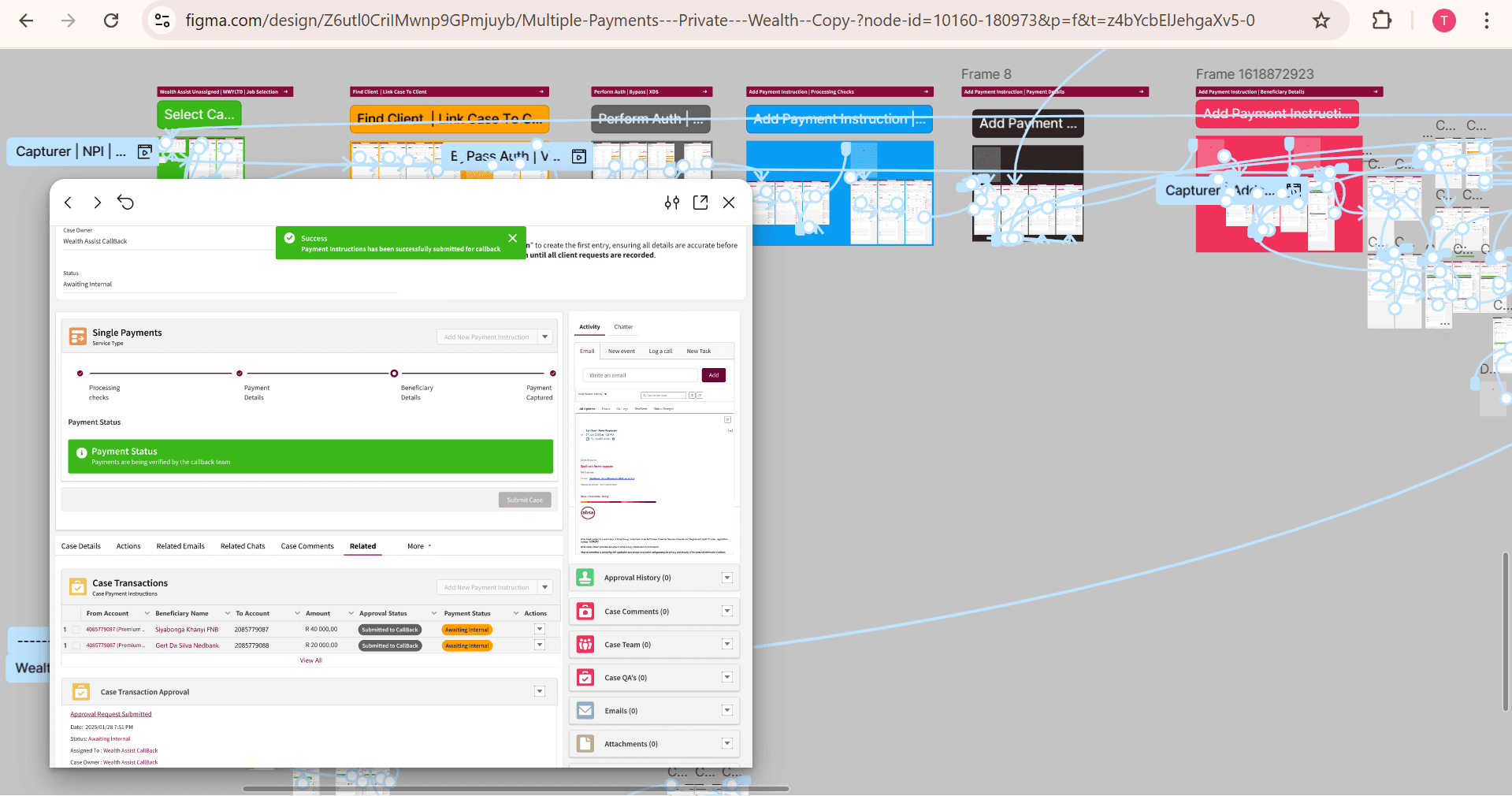
Prototype screen showing Proof of Payment selection
Image
Visual Design & Brand Integration
I collaborated closely with our brand team to align the consolidated case interface with corporate visual guidelines. The visual design emphasized clarity, trust, and professionalism.
Key design elements:
Consistent use of brand colors for role differentiation.
Clear typography and spacing to reduce visual clutter
Iconography to support stepper progress and validation status.
System message styles conforming to accessibility standards.
Visual hierarchy reinforced role permissions and system states.
High contrast and accessible colors ensured usability across diverse use
Final UI mockup highlighting brand compliant colors and icons
Image
Style guide excerpt for visual consistency
Image
Accessibility & Inclusive Design
Accessibility was integral throughout the design and development process. I ensured compliance with WCAG 2.1 AA standards, focusing on keyboard navigation, screen reader support, and color contrast.
Specific measures included:
Semantic HTML elements supporting assistive technologies.
ARIA landmarks and roles for dynamic content like the stepper.
Sufficient contrast ratios for text and icons.
Clear focus indicators and logical tab order.
Inclusive design accommodated users with diverse abilities and workflows.
Accessibility testing involved manual and automated audits with user feedback.
"The improved navigation allows me to complete tasks independently and confidently."
- Wealth assist process validator
Accessibility testing report summary and issue resolutions
Image
Handoff & Implementation Support
I prepared detailed design documentation, annotated prototypes, and component specifications to facilitate smooth handoff to development. Collaborative workshops ensured shared understanding of complex interactions and validations.
During implementation,
I provided ongoing UX support, reviewing builds, clarifying interactions, and ensuring visual fidelity.
Regular demos helped align product owners and compliance teams.
Proactively addressed edge cases, especially for role-based access and Proof of Payment flows.
Maintained open communication channels to resolve design questions quickly.
Design to dev queries reduced by 35% |
|---|
Annotated prototype excerpts for developer reference
Image
Post-Launch Analysis & Optimisation
After release, I led analysis of real-world usage data and user feedback to assess impact and identify optimization opportunities. Early results confirmed significant reductions in duplicate case creation and faster turnaround times.
We prioritised incremental improvements:
Enhanced inline guidance based on error patterns.
Streamlined Proof of Payment flow for merged transactions.
Optimized account reuse selection to further speed up data entry.
Continuous monitoring enabled proactive response to emerging user needs.
Cross-team reviews ensured alignment on compliance and operational metrics.
"The new consolidated case model has noticeably reduced my workload and improved accuracy."
-Wealth Assist Capturer
30% faster turnaround time (projected) |
|---|
Post-launch dashboard showing key performance indicator
Image
Impact Assessment & Lessons Learned
The consolidated case model delivered measurable business and user benefits. Duplicate case creation dropped significantly, reducing consultant workload and improving QA throughput. Clients experienced fewer callbacks and faster payment processing, strengthening trust.
Key impact metrics:
50% reduction in duplicate case creation
25% decrease in QA rework due to structured transactions
95% first-time-right capture rate achieved with validations
90% duplicate cases (n=600, 3 month post-launch) |
|---|
-25% QA rework (n=1,200, 3 mo post-launch) |
|---|
Lessons learned included the value of early stakeholder collaboration, the power of role-based interfaces, and the importance of inline guidance to improve data accuracy. These insights will inform future feature developments and process improvements
Gallery
Initial fragmented case creation workflow
Image
Illustrates the baseline multi-case approach and pain points.
Image Consolidated case model wireframe with stepper
Demonstrates guided multi-instruction capture flow
Image Role-specific view mockups
Highlights permission-based UI tailored to user responsibilities
Image High-fidelity prototype screen with inline guidance
Shows system messages reducing data entry errors.
Image Proof of Payment flow options
Compares per-beneficiary and merged payment confirmation views
Image Accessibility testing report and remediation summary
Ensures compliance with WCAG 2.1 AA standards
Image Post-launch dashboard with key performance metrics